What is a Device Alarm?
An Device Alarm is triggered when a device behaves unexpectedly. This may indicate the need to remotely or physically troubleshoot a device.
To see a live overview of the status of all devices, visit the Device/ Nodes. To see the detailed status for one device, visit the Device Status Details page to find a list of all active and cleared Device Alarms- Device Status Details page walkthrough.
To subscribe to daily email summaries of Device Alarms, follow the steps below.
Subscribe to Device Alarms
Note: Notification preferences are per user - they don’t affect others in your organization.
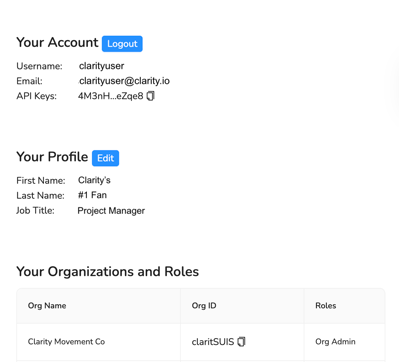
To subscribe to a Device Alarm email, navigate to Account Settings in the top right corner of the Dashboard.

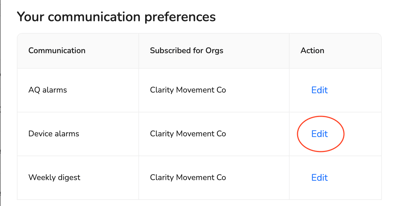
Open Account Settings and scroll down to Your communication preferences. Select Edit next to Device Alarms.
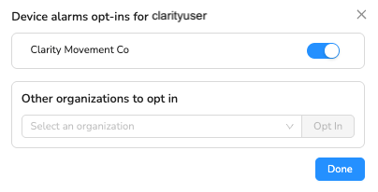
Toggle on to subscribe to email notifications. For users who can access data from multiple organizations, opt in to the organization(s) of interest. To remove your email notifications for an organization, toggle off to unsubscribe.
Receiving Device Alarm Emails
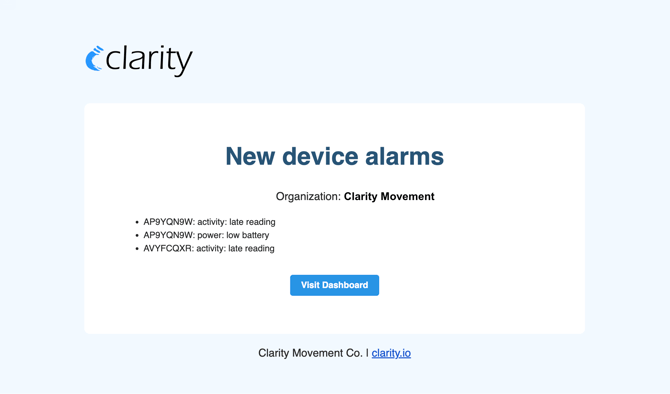
Should a device alarm be active for the selected organization, a daily email digest will be sent that includes all active device alarms associated with that organization. Individual email digests will be sent for each organization.
Tip: To prevent emails from going to spam, add no-reply@clairity.io as a contact.
Emails will appear in the following format and will include the Device ID and Device Alarm type. To investigate the active alarms, click on Visit Dashboard to log in to your account.